为静态站点添加点赞和访问统计功能
本文介绍如何使用 Cloudflare Workers + KV 为静态网站添加点赞和访问统计功能。基于 hugo-bearneo 的 Upvote 功能扩展而来,支持:
- ✅ 点赞功能:用户对文章点赞,统计点赞数,记录点赞状态
- ✅ 访问统计:自动记录文章访问次数,防刷机制
- ✅ 完全免费:使用 Cloudflare 免费额度
- ✅ 隐私保护:使用哈希保护用户身份
- ✅ 易于部署:无需数据库,几分钟完成部署
部署指南
部署 Worker
注册/登录 Cloudflare 后台,前往 Workers 模块后点击 Create(下图 2 处)。
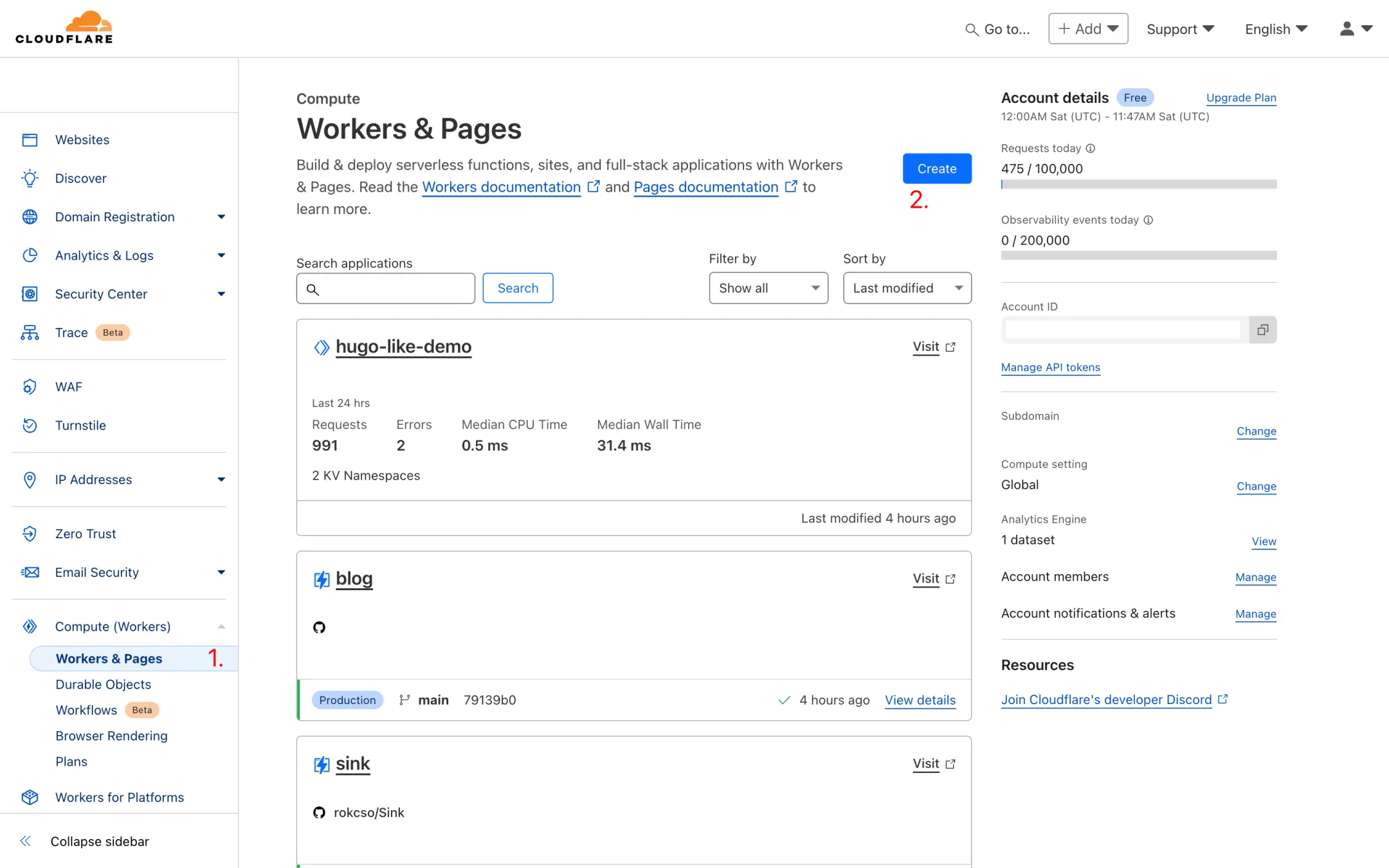
点击 Create Worker(下图 3 处)。
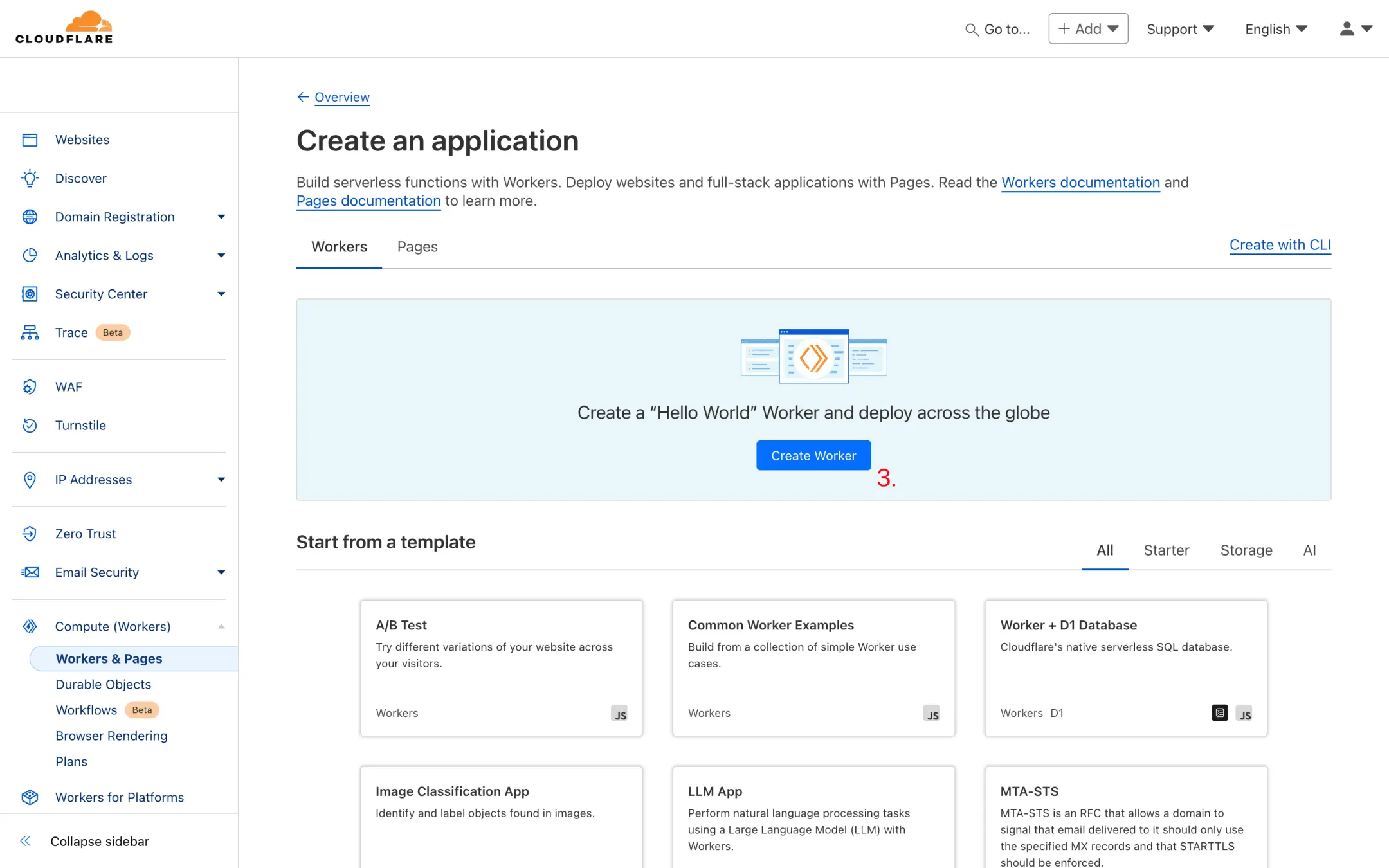
随便输入一个名称(比如 post-upvote)后点击 Deploy(下图 5 处)。
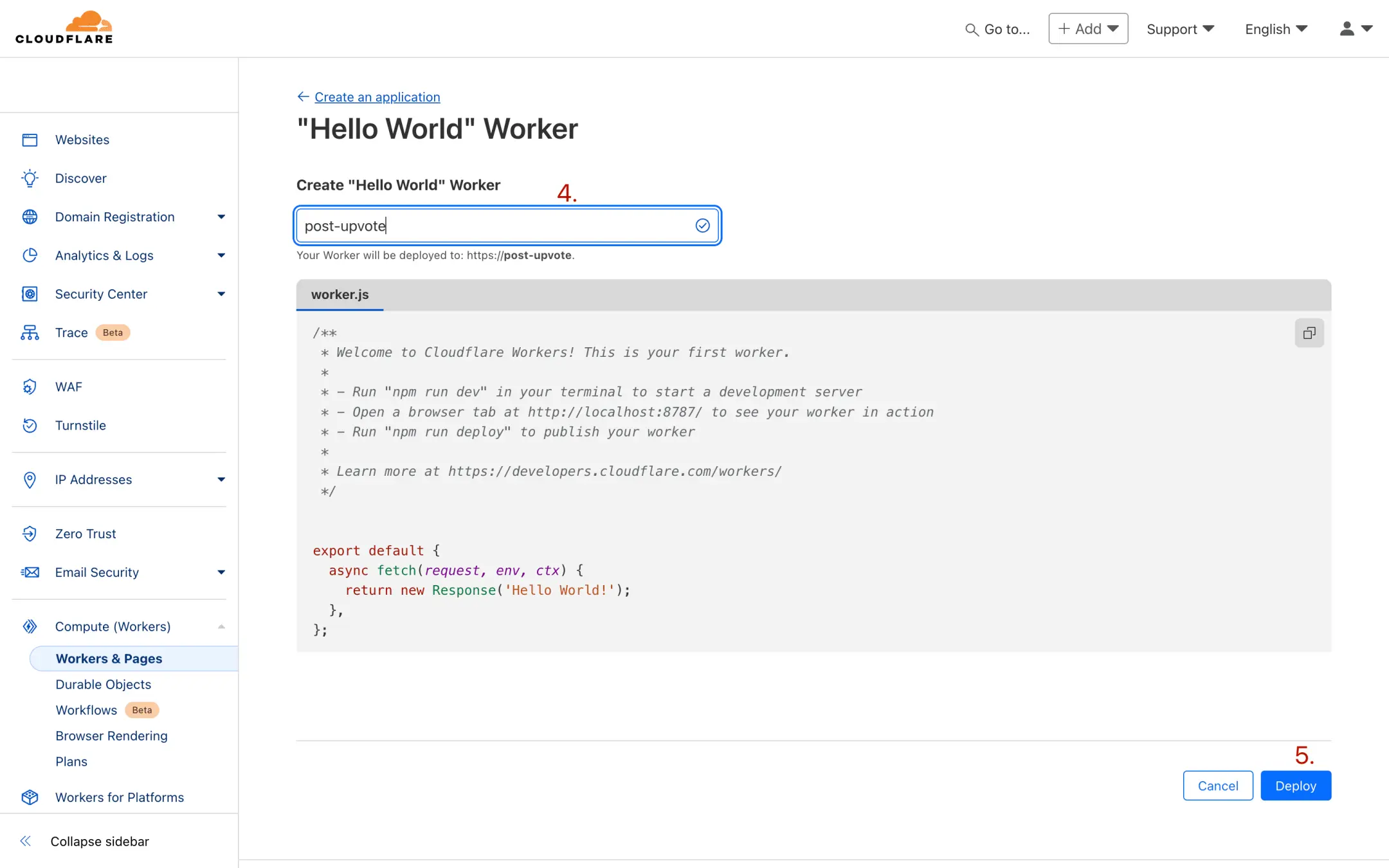
然后点击 Edit code(下图 6 处)。
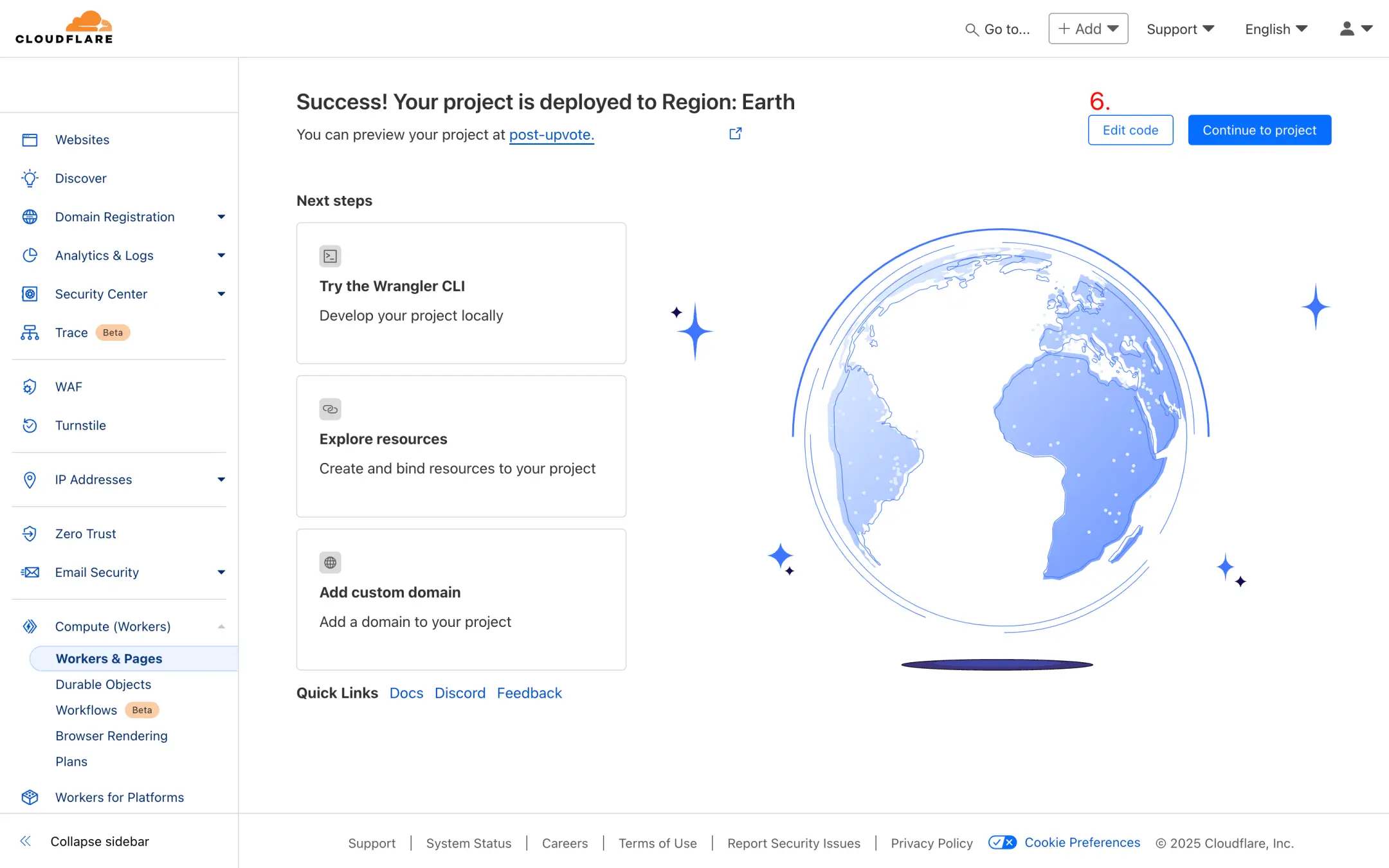
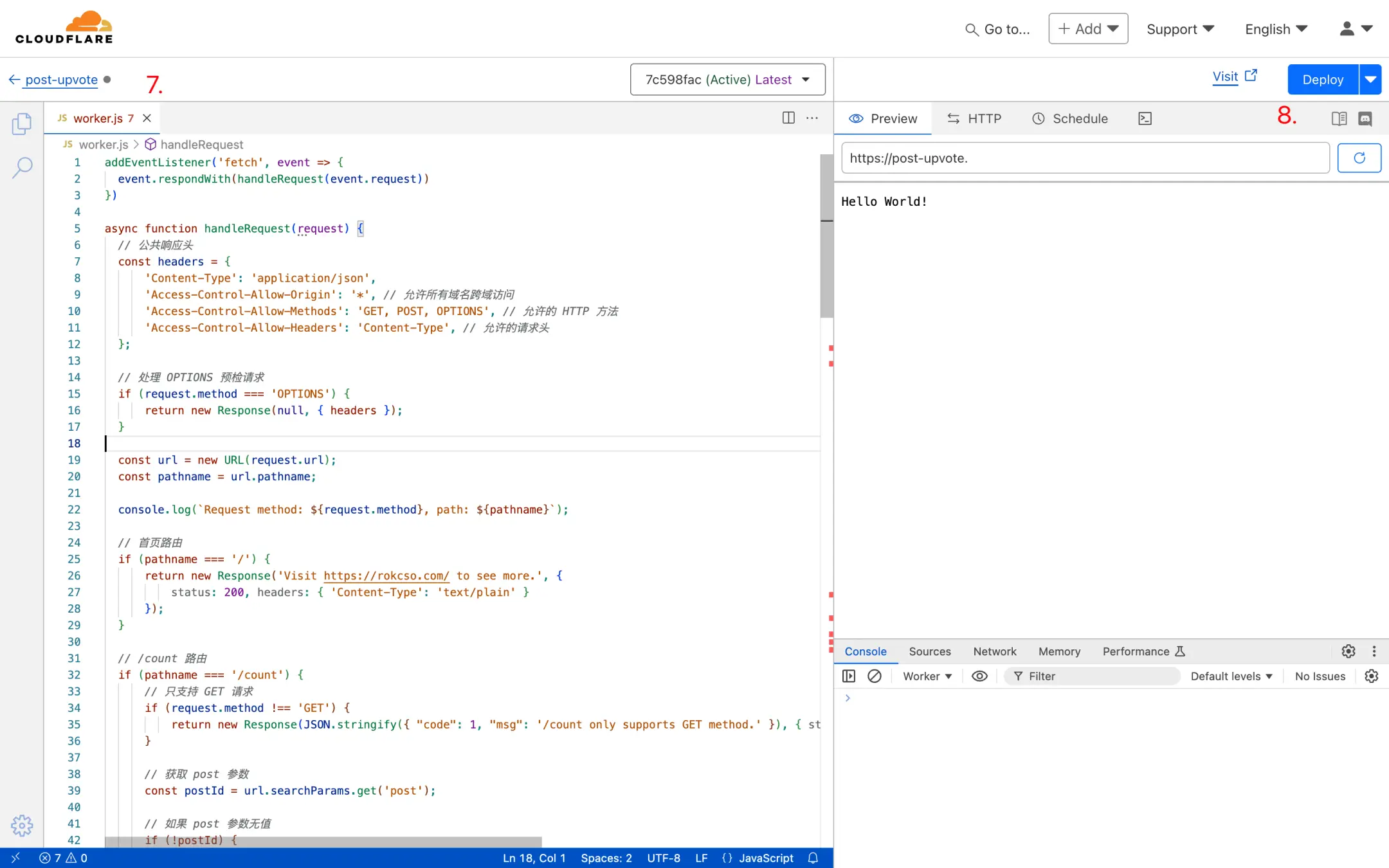
删除代码编辑器(下图 7 处)中原有的代码,将本项目 worker.js 中的代码完全复制粘贴到代码编辑器中,点击 Deploy(下图 8 处)。
创建 KV namespace
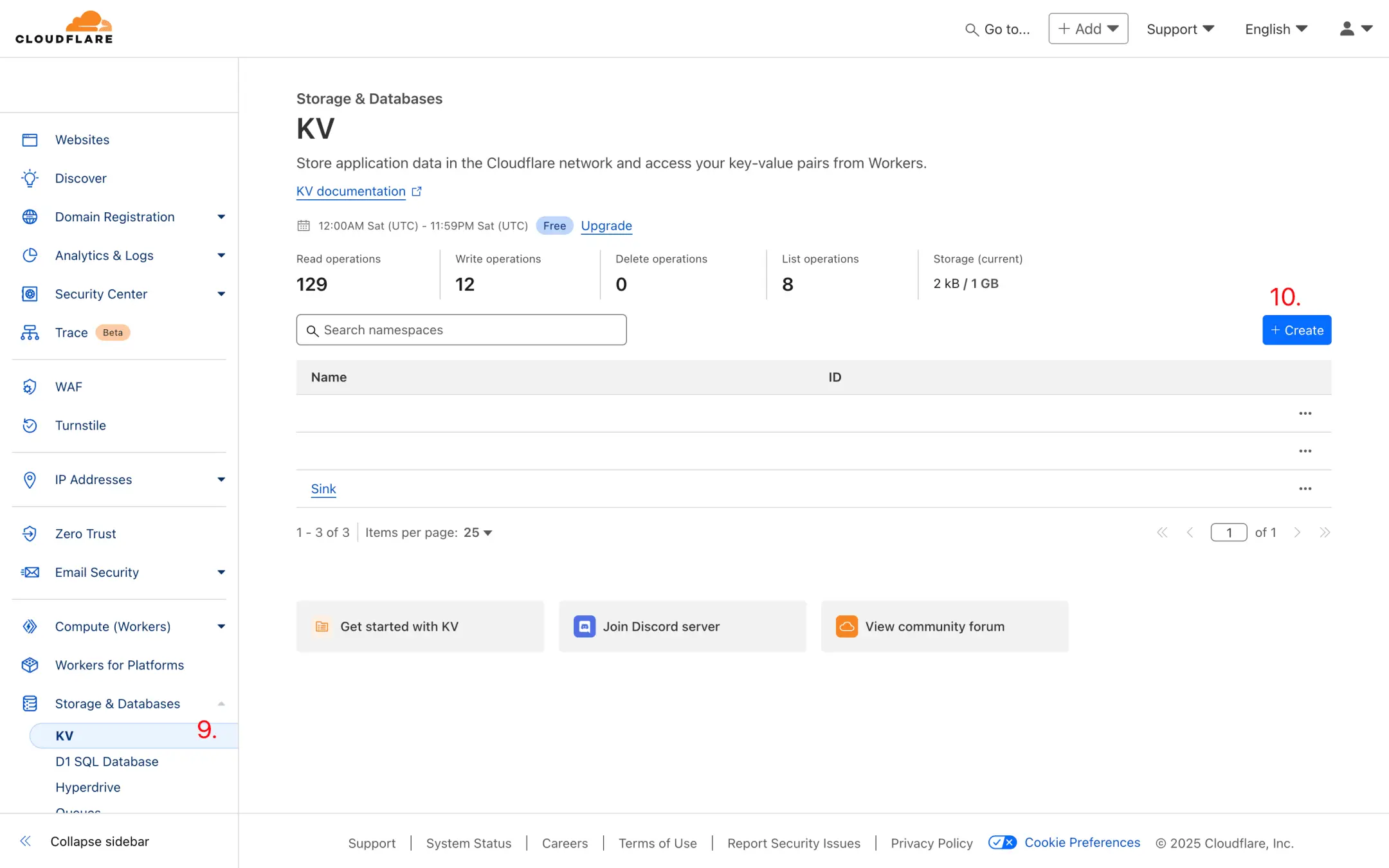
注册/登录 Cloudflare 后台,前往 KV 模块后点击 Create(下图 10 处)。
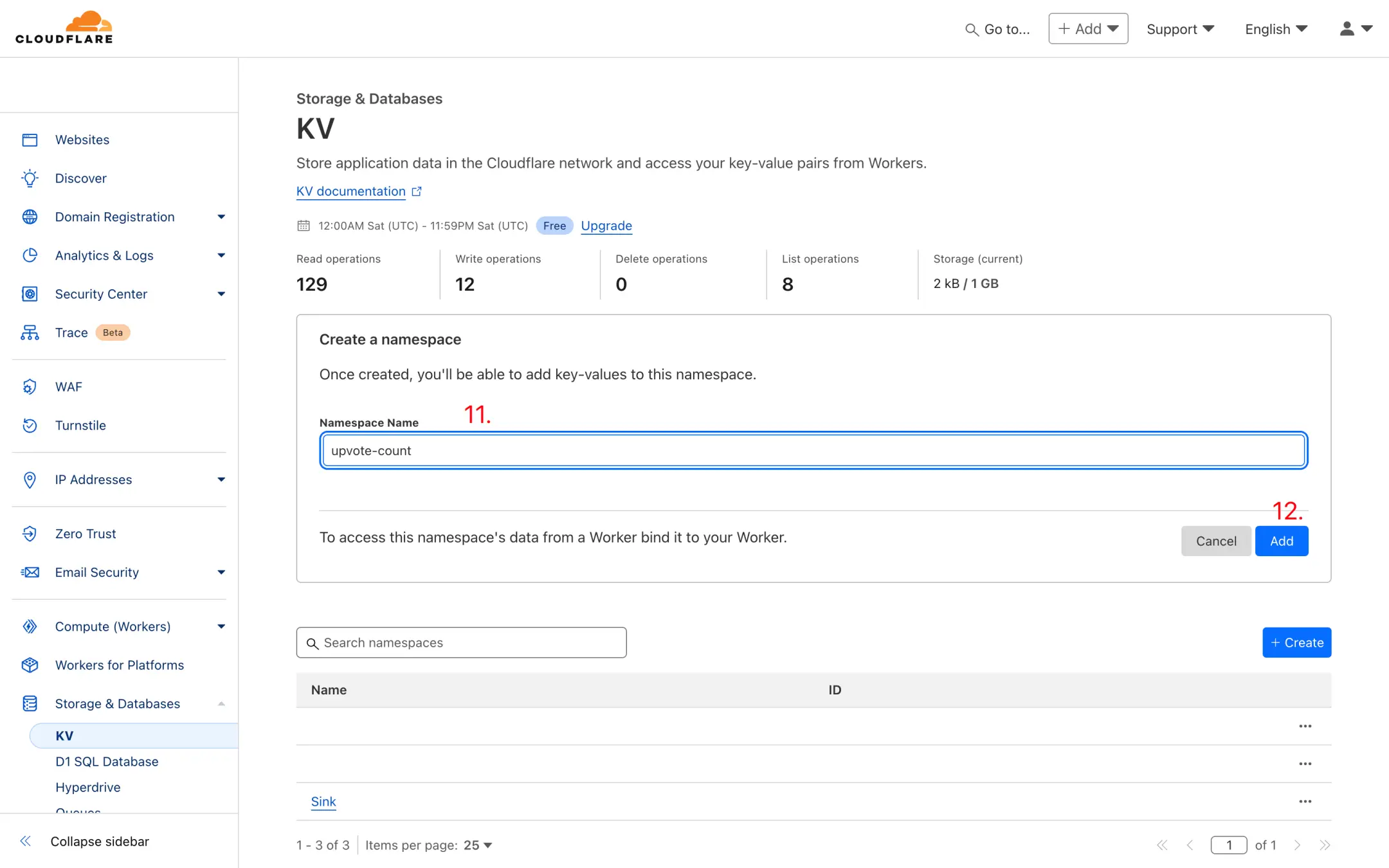
随便输入一个名称(比如 upvote-count)后点击 Add(下图 12 处)。
用相同的步骤再创建一个 KV namespace,依然可以随便命名(比如 upvote-record)。
为 Worker 绑定 KV namespace
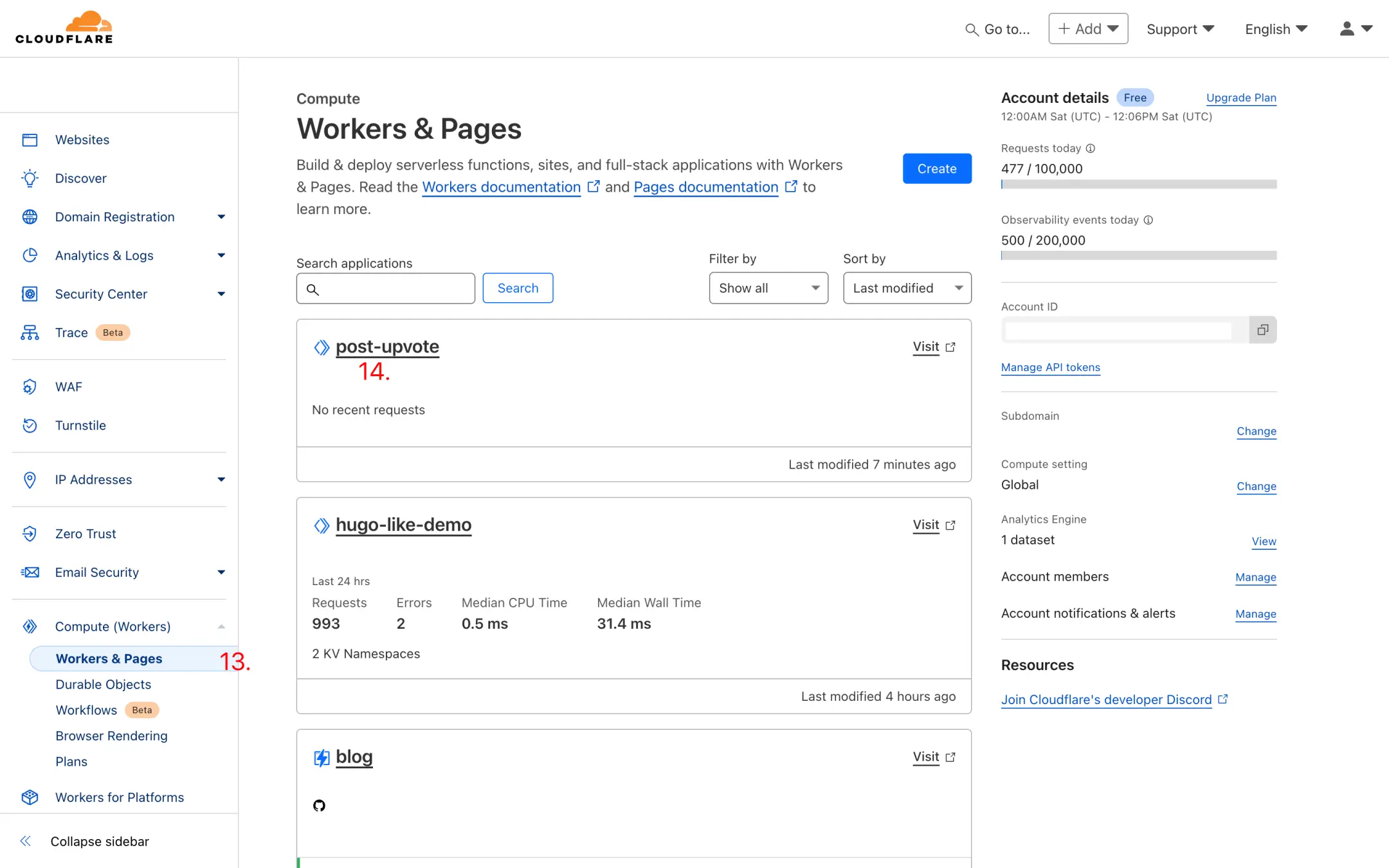
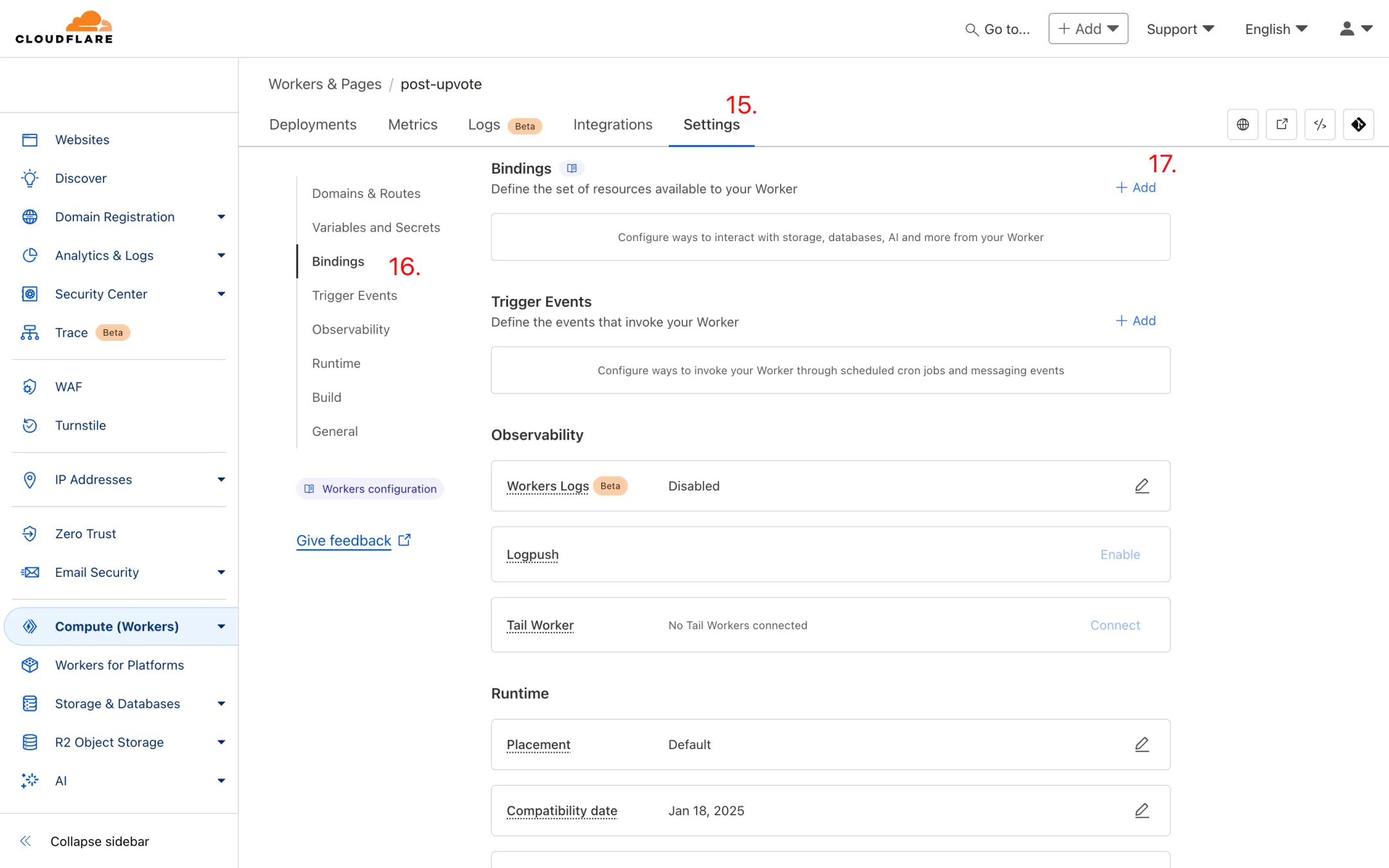
注册/登录 Cloudflare 后台,前往 Workers 模块后点击进入刚刚创建的 Worker(如本案例中下图 14 处的 post-upvote)。
前往该 Worker 中的 Settings -> Bindings,点击 Add(下图 17 处)。
选择 KV namespace 后输入 Variable name 为 UPVOTE_COUNT,然后选择一个刚刚创建的 KV namespace(比如 upvote-count),随后点击 Save(下图 20 处)。
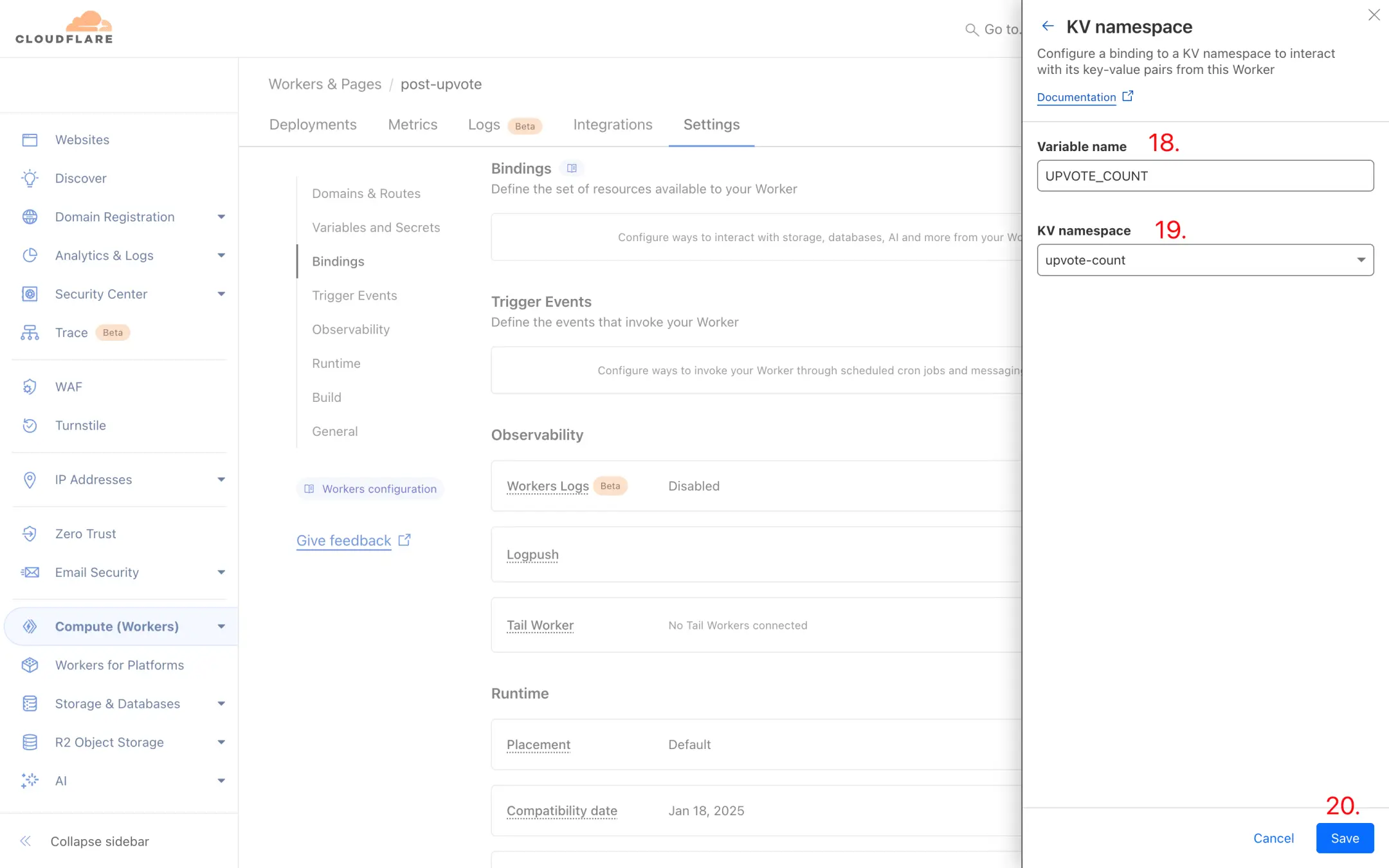
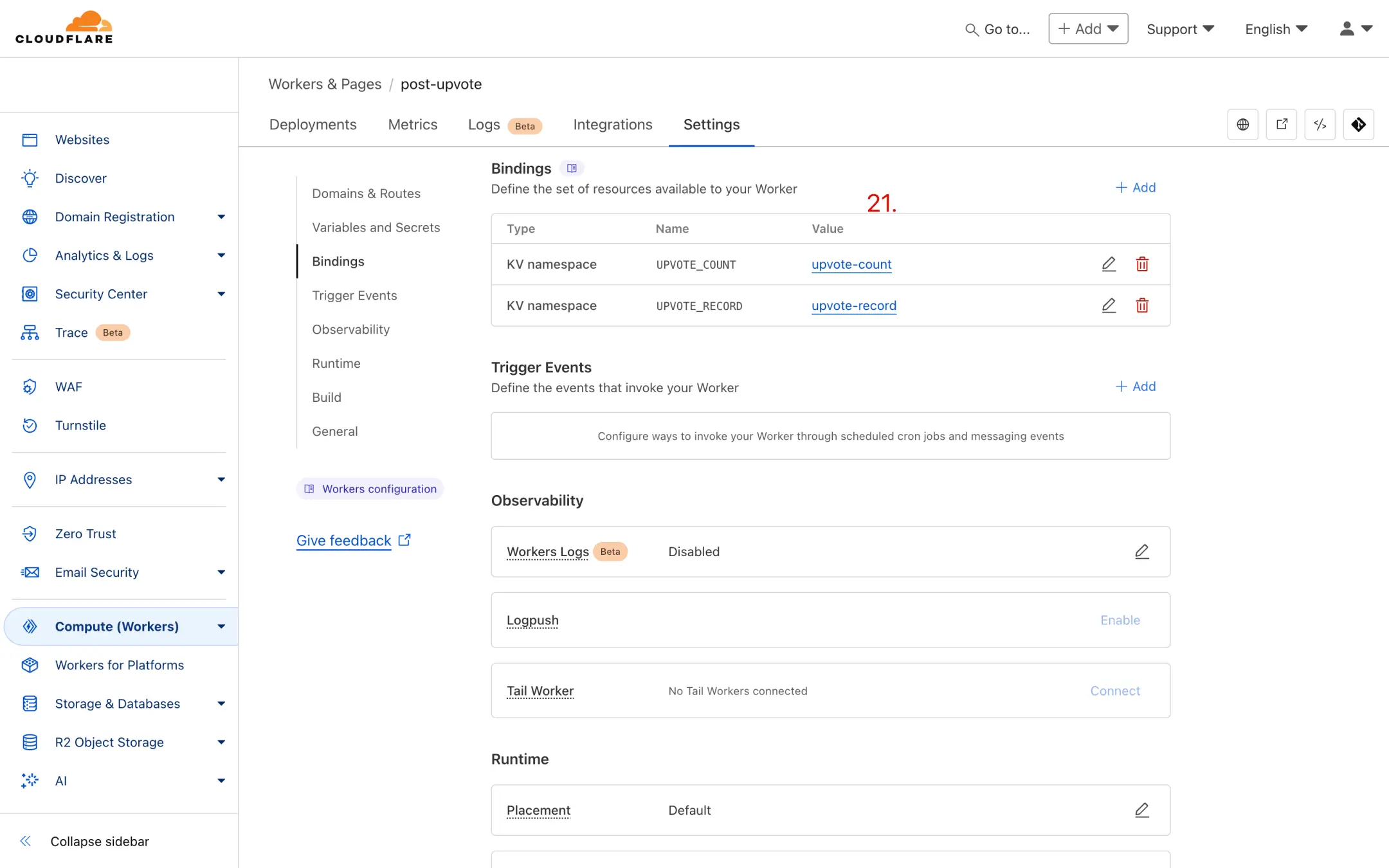
用相同的步骤再创建一个 Variable name 为 UPVOTE_RECORD,选择刚刚创建的另一个 KV namespace(比如 upvote-record),随后点击 Save。
正确的配置应如下图 21 处,Variable name(即 UPVOTE_COUNT 和 UPVOTE_RECORD)一定不能错。
测试
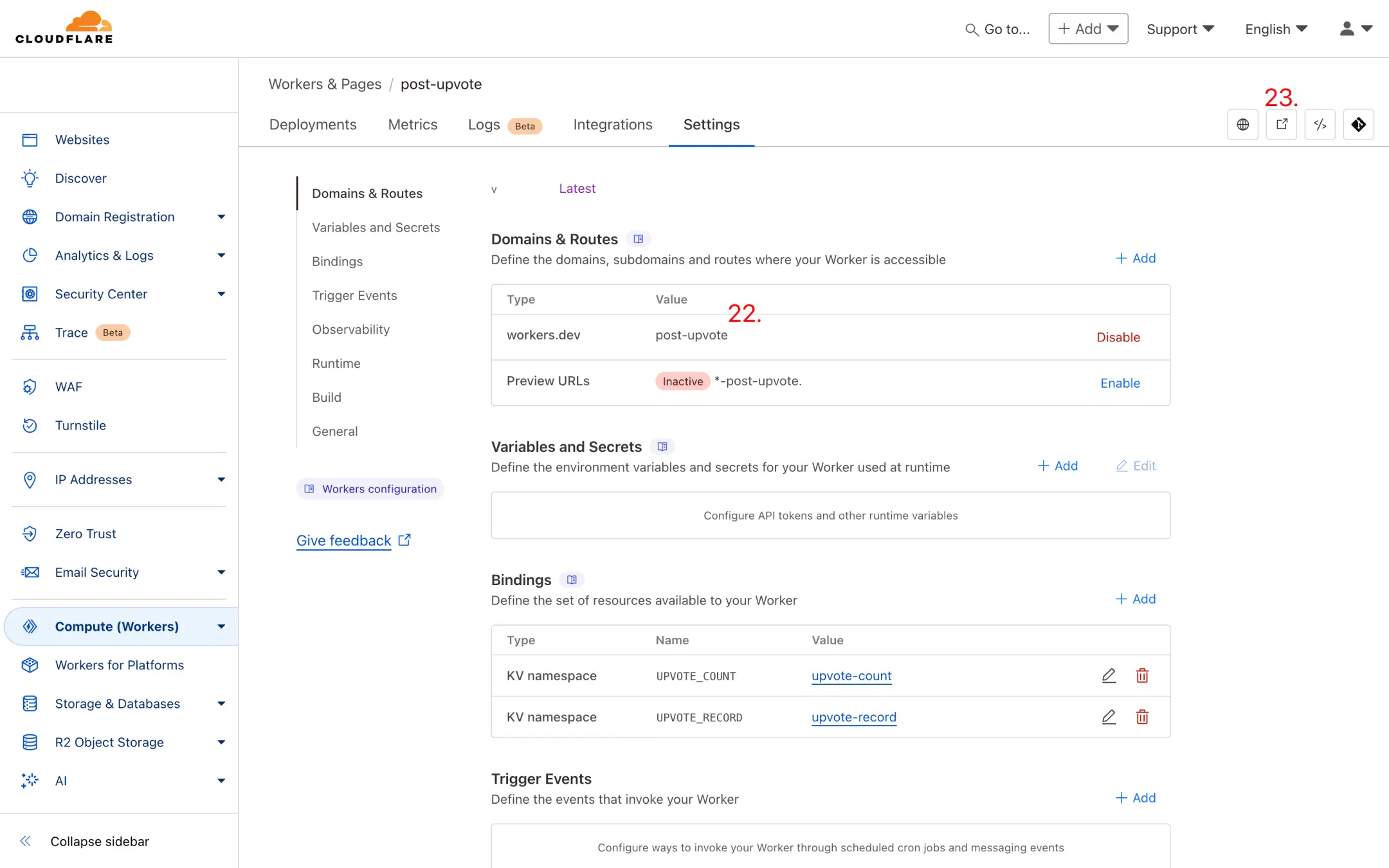
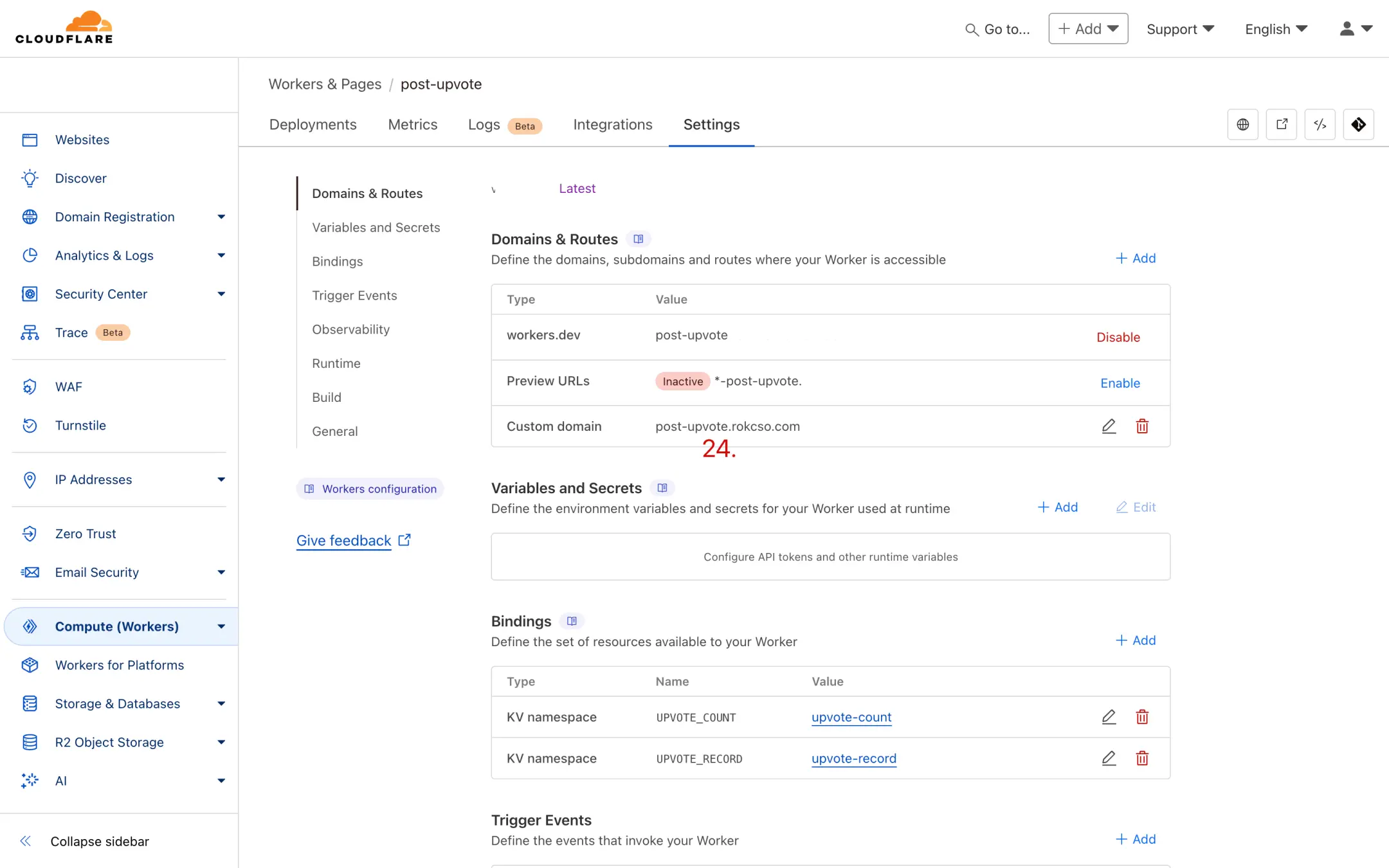
注册/登录 Cloudflare 后台,前往 Workers 模块后点击进入刚刚创建的 Worker,进入该 Worker 中的 Settings -> Domains & Routes,此处默认启用的 workers.dev 域名后对应的 Value(下图 22 处)即为该 Worker 的域名。
或者直接点击下图 23 处访问该 Worker 的域名。
通过浏览器访问该 Worker 的域名后如果能看到如下图提示即为部署成功。

注意事项
中国境内可能无法顺畅访问 Cloudflare Workers 的 workers.dev 域名,可以通过为该 Worker 添加一个自定义域名解决。
通用集成方法
部署完成后,你可以在任何静态网站中集成这个点赞功能。以下是通用的前端集成方法:
API 接口说明
假设你的 Worker 域名为 https://your-worker.workers.dev,API 提供以下接口:
1. 获取文章点赞数
GET https://your-worker.workers.dev/upvote?postId=your-post-id2. 点赞/取消点赞
POST https://your-worker.workers.dev/upvote
Content-Type: application/json

{
  "postId": "your-post-id"
}
前端实现示例
以下是一个简单的 HTML + JavaScript 实现示例:
<div class="upvote-container">
  <button id="upvote-btn" class="upvote-button">
    <span class="icon">👍</span>
    <span id="upvote-count">0</span>
  </button>
</div>

<script>
// 配置你的 Worker 域名
const API_URL = 'https://your-worker.workers.dev/upvote';
// 使用文章的唯一标识作为 postId(如 slug、路径等)
const POST_ID = window.location.pathname;

// 获取点赞数
async function getUpvoteCount() {
  try {
    const response = await fetch(`${API_URL}?postId=${encodeURIComponent(POST_ID)}`);
    const data = await response.json();

    document.getElementById('upvote-count').textContent = data.count || 0;

    // 根据用户是否已点赞更新按钮状态
    const button = document.getElementById('upvote-btn');
    if (data.upvoted) {
      button.classList.add('upvoted');
    }
  } catch (error) {
    console.error('获取点赞数失败:', error);
  }
}

// 点赞/取消点赞
async function toggleUpvote() {
  const button = document.getElementById('upvote-btn');
  button.disabled = true;

  try {
    const response = await fetch(API_URL, {
      method: 'POST',
      headers: {
        'Content-Type': 'application/json',
      },
      body: JSON.stringify({ postId: POST_ID })
    });

    const data = await response.json();

    // 更新点赞数
    document.getElementById('upvote-count').textContent = data.count || 0;

    // 更新按钮状态
    if (data.upvoted) {
      button.classList.add('upvoted');
    } else {
      button.classList.remove('upvoted');
    }
  } catch (error) {
    console.error('点赞操作失败:', error);
  } finally {
    button.disabled = false;
  }
}

// 页面加载时获取点赞数
getUpvoteCount();

// 绑定点击事件
document.getElementById('upvote-btn').addEventListener('click', toggleUpvote);
</script>

<style>
.upvote-button {
  display: inline-flex;
  align-items: center;
  gap: 8px;
  padding: 8px 16px;
  border: 2px solid #e5e7eb;
  background: white;
  border-radius: 8px;
  cursor: pointer;
  transition: all 0.2s;
  font-size: 16px;
}

.upvote-button:hover {
  border-color: #3b82f6;
  background: #eff6ff;
}

.upvote-button.upvoted {
  border-color: #3b82f6;
  background: #3b82f6;
  color: white;
}

.upvote-button:disabled {
  opacity: 0.6;
  cursor: not-allowed;
}
</style>
框架集成示例
React / Next.js
import { useState, useEffect } from 'react';

export default function UpvoteButton({ postId }) {
  const [count, setCount] = useState(0);
  const [upvoted, setUpvoted] = useState(false);
  const [loading, setLoading] = useState(false);

  const API_URL = 'https://your-worker.workers.dev/upvote';

  useEffect(() => {
    fetchUpvoteData();
  }, [postId]);

  async function fetchUpvoteData() {
    try {
      const response = await fetch(`${API_URL}?postId=${encodeURIComponent(postId)}`);
      const data = await response.json();
      setCount(data.count || 0);
      setUpvoted(data.upvoted || false);
    } catch (error) {
      console.error('获取点赞数失败:', error);
    }
  }

  async function handleUpvote() {
    setLoading(true);
    try {
      const response = await fetch(API_URL, {
        method: 'POST',
        headers: { 'Content-Type': 'application/json' },
        body: JSON.stringify({ postId })
      });
      const data = await response.json();
      setCount(data.count || 0);
      setUpvoted(data.upvoted || false);
    } catch (error) {
      console.error('点赞操作失败:', error);
    } finally {
      setLoading(false);
    }
  }

  return (
    <button
      onClick={handleUpvote}
      disabled={loading}
      className={upvoted ? 'upvoted' : ''}
    >
      <span>👍</span>
      <span>{count}</span>
    </button>
  );
}
Vue / Nuxt
<template>
  <button
    @click="toggleUpvote"
    :disabled="loading"
    :class="{ upvoted }"
    class="upvote-button"
  >
    <span>👍</span>
    <span>{{ count }}</span>
  </button>
</template>

<script setup>
import { ref, onMounted } from 'vue';

const props = defineProps({
  postId: String
});

const API_URL = 'https://your-worker.workers.dev/upvote';
const count = ref(0);
const upvoted = ref(false);
const loading = ref(false);

async function fetchUpvoteData() {
  try {
    const response = await fetch(`${API_URL}?postId=${encodeURIComponent(props.postId)}`);
    const data = await response.json();
    count.value = data.count || 0;
    upvoted.value = data.upvoted || false;
  } catch (error) {
    console.error('获取点赞数失败:', error);
  }
}

async function toggleUpvote() {
  loading.value = true;
  try {
    const response = await fetch(API_URL, {
      method: 'POST',
      headers: { 'Content-Type': 'application/json' },
      body: JSON.stringify({ postId: props.postId })
    });
    const data = await response.json();
    count.value = data.count || 0;
    upvoted.value = data.upvoted || false;
  } catch (error) {
    console.error('点赞操作失败:', error);
  } finally {
    loading.value = false;
  }
}

onMounted(() => {
  fetchUpvoteData();
});
</script>
如何在 hugo 中启用 Upvote 功能?
详见 hugo-bearneo 提供的 使用指南。
自定义域名配置
如果你想使用自定义域名(推荐),可以在 Cloudflare Workers 的 Settings -> Domains & Routes 中添加自定义域名,这样可以避免 workers.dev 域名在国内访问不畅的问题。
扩展功能:添加访问统计
在点赞功能的基础上,我们可以轻松添加访问统计功能,无需创建新的 KV namespace。
更新 Worker 代码
将以下完整代码替换到你的 Worker 中(包含点赞 + 访问统计):
// Cloudflare Worker - 点赞 + 访问统计
addEventListener('fetch', event => {
  event.respondWith(handleRequest(event.request))
})

async function handleRequest(request) {
  const url = new URL(request.url)
  const path = url.pathname

  // CORS 头
  const corsHeaders = {
    'Access-Control-Allow-Origin': '*',
    'Access-Control-Allow-Methods': 'GET, POST, OPTIONS',
    'Access-Control-Allow-Headers': 'Content-Type',
  }

  // 处理 OPTIONS 请求
  if (request.method === 'OPTIONS') {
    return new Response(null, { headers: corsHeaders })
  }

  // 路由处理
  if (path === '/like' || path === '/upvote') {
    return handleLike(request, corsHeaders)
  } else if (path === '/count') {
    return handleGetCount(request, corsHeaders)
  } else if (path === '/view' || path === '/pageview') {
    return handlePageView(request, corsHeaders)
  } else if (path === '/stats') {
    return handleGetStats(request, corsHeaders)
  } else {
    return new Response(JSON.stringify({
      code: 0,
      message: 'API is running',
      endpoints: {
        like: 'POST /like - 点赞/取消点赞',
        count: 'GET /count?post=xxx - 获取点赞数',
        view: 'POST /view - 记录访问',
        stats: 'GET /stats?post=xxx - 获取统计数据(点赞+访问)'
      }
    }), {
      headers: { ...corsHeaders, 'Content-Type': 'application/json' }
    })
  }
}

// 处理点赞
async function handleLike(request, corsHeaders) {
  if (request.method !== 'POST') {
    return new Response(JSON.stringify({ code: 1, message: 'Method not allowed' }), {
      status: 405,
      headers: { ...corsHeaders, 'Content-Type': 'application/json' }
    })
  }

  try {
    const body = await request.json()
    const postId = body.postId || body.post

    if (!postId) {
      return new Response(JSON.stringify({ code: 1, message: 'Missing postId' }), {
        status: 400,
        headers: { ...corsHeaders, 'Content-Type': 'application/json' }
      })
    }

    // 获取用户标识(IP + User-Agent)
    const ip = request.headers.get('CF-Connecting-IP') || 'unknown'
    const userAgent = request.headers.get('User-Agent') || 'unknown'
    const userId = await hashString(`${ip}-${userAgent}`)

    // 检查是否已点赞
    const recordKey = `like:${postId}:${userId}`
    const hasLiked = await UPVOTE_RECORD.get(recordKey)

    let newCount
    if (hasLiked) {
      // 取消点赞
      await UPVOTE_RECORD.delete(recordKey)
      const countKey = `like:count:${postId}`
      const currentCount = parseInt(await UPVOTE_COUNT.get(countKey) || '0')
      newCount = Math.max(0, currentCount - 1)
      await UPVOTE_COUNT.put(countKey, newCount.toString())
    } else {
      // 点赞
      await UPVOTE_RECORD.put(recordKey, '1', { expirationTtl: 31536000 })
      const countKey = `like:count:${postId}`
      const currentCount = parseInt(await UPVOTE_COUNT.get(countKey) || '0')
      newCount = currentCount + 1
      await UPVOTE_COUNT.put(countKey, newCount.toString())
    }

    return new Response(JSON.stringify({
      code: 0,
      data: {
        count: newCount,
        hasLiked: !hasLiked
      }
    }), {
      headers: { ...corsHeaders, 'Content-Type': 'application/json' }
    })
  } catch (error) {
    return new Response(JSON.stringify({ code: 1, message: error.message }), {
      status: 500,
      headers: { ...corsHeaders, 'Content-Type': 'application/json' }
    })
  }
}

// 获取点赞数
async function handleGetCount(request, corsHeaders) {
  const url = new URL(request.url)
  const postId = url.searchParams.get('post') || url.searchParams.get('postId')

  if (!postId) {
    return new Response(JSON.stringify({ code: 1, message: 'Missing post parameter' }), {
      status: 400,
      headers: { ...corsHeaders, 'Content-Type': 'application/json' }
    })
  }

  try {
    const countKey = `like:count:${postId}`
    const count = parseInt(await UPVOTE_COUNT.get(countKey) || '0')

    const ip = request.headers.get('CF-Connecting-IP') || 'unknown'
    const userAgent = request.headers.get('User-Agent') || 'unknown'
    const userId = await hashString(`${ip}-${userAgent}`)
    const recordKey = `like:${postId}:${userId}`
    const hasLiked = !!(await UPVOTE_RECORD.get(recordKey))

    return new Response(JSON.stringify({
      code: 0,
      data: { count, hasLiked }
    }), {
      headers: { ...corsHeaders, 'Content-Type': 'application/json' }
    })
  } catch (error) {
    return new Response(JSON.stringify({ code: 1, message: error.message }), {
      status: 500,
      headers: { ...corsHeaders, 'Content-Type': 'application/json' }
    })
  }
}

// 记录页面访问
async function handlePageView(request, corsHeaders) {
  if (request.method !== 'POST') {
    return new Response(JSON.stringify({ code: 1, message: 'Method not allowed' }), {
      status: 405,
      headers: { ...corsHeaders, 'Content-Type': 'application/json' }
    })
  }

  try {
    const body = await request.json()
    const postId = body.postId || body.post

    if (!postId) {
      return new Response(JSON.stringify({ code: 1, message: 'Missing postId' }), {
        status: 400,
        headers: { ...corsHeaders, 'Content-Type': 'application/json' }
      })
    }

    const ip = request.headers.get('CF-Connecting-IP') || 'unknown'
    const userAgent = request.headers.get('User-Agent') || 'unknown'
    const userId = await hashString(`${ip}-${userAgent}`)

    // 检查是否在5分钟内重复访问(防刷)
    const viewRecordKey = `view:record:${postId}:${userId}`
    const recentView = await UPVOTE_RECORD.get(viewRecordKey)

    if (!recentView) {
      // 记录访问(5分钟内不重复计数)
      await UPVOTE_RECORD.put(viewRecordKey, '1', { expirationTtl: 300 })

      // 增加访问计数
      const countKey = `view:count:${postId}`
      const currentCount = parseInt(await UPVOTE_COUNT.get(countKey) || '0')
      const newCount = currentCount + 1
      await UPVOTE_COUNT.put(countKey, newCount.toString())

      return new Response(JSON.stringify({
        code: 0,
        data: { views: newCount, counted: true }
      }), {
        headers: { ...corsHeaders, 'Content-Type': 'application/json' }
      })
    } else {
      const countKey = `view:count:${postId}`
      const currentCount = parseInt(await UPVOTE_COUNT.get(countKey) || '0')

      return new Response(JSON.stringify({
        code: 0,
        data: { views: currentCount, counted: false }
      }), {
        headers: { ...corsHeaders, 'Content-Type': 'application/json' }
      })
    }
  } catch (error) {
    return new Response(JSON.stringify({ code: 1, message: error.message }), {
      status: 500,
      headers: { ...corsHeaders, 'Content-Type': 'application/json' }
    })
  }
}

// 获取统计数据(点赞 + 访问)
async function handleGetStats(request, corsHeaders) {
  const url = new URL(request.url)
  const postId = url.searchParams.get('post') || url.searchParams.get('postId')

  if (!postId) {
    return new Response(JSON.stringify({ code: 1, message: 'Missing post parameter' }), {
      status: 400,
      headers: { ...corsHeaders, 'Content-Type': 'application/json' }
    })
  }

  try {
    const likeCountKey = `like:count:${postId}`
    const likeCount = parseInt(await UPVOTE_COUNT.get(likeCountKey) || '0')

    const viewCountKey = `view:count:${postId}`
    const viewCount = parseInt(await UPVOTE_COUNT.get(viewCountKey) || '0')

    const ip = request.headers.get('CF-Connecting-IP') || 'unknown'
    const userAgent = request.headers.get('User-Agent') || 'unknown'
    const userId = await hashString(`${ip}-${userAgent}`)
    const recordKey = `like:${postId}:${userId}`
    const hasLiked = !!(await UPVOTE_RECORD.get(recordKey))

    return new Response(JSON.stringify({
      code: 0,
      data: { likes: likeCount, views: viewCount, hasLiked }
    }), {
      headers: { ...corsHeaders, 'Content-Type': 'application/json' }
    })
  } catch (error) {
    return new Response(JSON.stringify({ code: 1, message: error.message }), {
      status: 500,
      headers: { ...corsHeaders, 'Content-Type': 'application/json' }
    })
  }
}

// 哈希函数
async function hashString(str) {
  const encoder = new TextEncoder()
  const data = encoder.encode(str)
  const hashBuffer = await crypto.subtle.digest('SHA-256', data)
  const hashArray = Array.from(new Uint8Array(hashBuffer))
  return hashArray.map(b => b.toString(16).padStart(2, '0')).join('')
}
API 接口说明
更新后的 API 提供以下接口:
1. 点赞/取消点赞
POST /like
Content-Type: application/json

{
  "postId": "your-post-id"
}
2. 获取点赞数
GET /count?post=your-post-id3. 记录页面访问(新增)
POST /view
Content-Type: application/json

{
  "postId": "your-post-id"
}
4. 获取完整统计(新增)
GET /stats?post=your-post-id返回:
{
  "code": 0,
  "data": {
    "likes": 10,
    "views": 123,
    "hasLiked": false
  }
}
数据存储说明
无需创建新的 KV namespace,通过 Key 前缀区分数据类型:
在 UPVOTE_COUNT 中:
like:count:{postId}- 点赞计数view:count:{postId}- 访问计数
在 UPVOTE_RECORD 中:
like:{postId}:{userId}- 点赞记录(1年过期)view:record:{postId}:{userId}- 访问记录(5分钟过期,防刷)
前端集成示例(Astro)
创建访问统计组件 src/components/ViewCount.astro:
---
import { siteConfig } from '../config';

interface Props {
  postId: string;
}

const { postId } = Astro.props;
const apiUrl = siteConfig.like.apiUrl;
---

<span class="view-count" id="view-count-container">
  <span id="view-count">--</span>
  <span>次阅读</span>
</span>

<script is:inline define:vars={{ postId, apiUrl }}>
  (function() {
    let viewRecorded = false;

    function initViewCount() {
      fetchViewCount();

      if (!viewRecorded) {
        setTimeout(() => {
          recordPageView();
          viewRecorded = true;
        }, 2000);
      }
    }

    async function fetchViewCount() {
      try {
        const response = await fetch(`${apiUrl}/stats?post=${encodeURIComponent(postId)}`);
        const data = await response.json();

        if (data.code === 0) {
          document.getElementById('view-count').textContent = data.data.views || 0;
        }
      } catch (error) {
        console.error('获取访问次数失败:', error);
      }
    }

    async function recordPageView() {
      try {
        await fetch(`${apiUrl}/view`, {
          method: 'POST',
          headers: { 'Content-Type': 'application/json' },
          body: JSON.stringify({ postId })
        });
      } catch (error) {
        console.error('记录访问失败:', error);
      }
    }

    if (document.readyState === 'loading') {
      document.addEventListener('DOMContentLoaded', initViewCount);
    } else {
      initViewCount();
    }

    document.addEventListener('astro:page-load', () => {
      viewRecorded = false;
      initViewCount();
    });
  })();
</script>
在文章页面使用:
---
import ViewCount from '../../components/ViewCount.astro';
---

<div class="article-meta">
  <time>{formatDate(post.data.date)}</time>
  <span>|</span>
  <span>{readingTime} 分钟</span>
  <span>|</span>
  <ViewCount postId={post.slug} />
</div>
功能特点
访问统计:
- ✅ 自动记录页面访问
- ✅ 5分钟内同一用户不重复计数
- ✅ 使用 SHA-256 哈希保护隐私
- ✅ 页面加载2秒后记录(避免误计数)
性能优化:
- ✅ 异步记录,不阻塞页面
- ✅ 复用现有 KV,零额外成本
- ✅ 支持 Astro View Transitions
测试
测试访问统计:
# 记录访问
curl -X POST https://your-worker.workers.dev/view \
  -H "Content-Type: application/json" \
  -d '{"postId": "test-post"}'

# 获取统计
curl "https://your-worker.workers.dev/stats?post=test-post"
注意事项
Cloudflare Workers 免费额度:
- 每天 100,000 次请求
- 每天 100,000 次 KV 读取
- 每天 1,000 次 KV 写入
对于个人博客完全够用。如果流量较大,建议:
- 增加防刷时间(如10分钟)
- 使用 Cloudflare Analytics 获取更详细数据
- 升级到付费计划
鸣谢
-
感谢 bearblog 创造了 Bear Blog,感谢 hugo-bearblog 将 Bear Blog 带到了 Hugo,更感谢 Rokcso 丰富了 Hugo Bearblog。
-
感谢 Cloudflare 提供了本项目得以实现的所有功能和资源。
评论 (0)
管理员身份验证
检测到您使用管理员邮箱,请输入管理员密钥以获得管理员标识。